
ADC Mugshots and Arkansas Custody
ADC stands for the Arkansas Division of Correction. It is the adult prison arm of the Arkansas Department of Corrections. The public inmate search covers people in state correctional custody. That makes it handy after sentencing. It is not a statewide arrest roster. County jails hold people earlier in a case. Someone awaiting court or transfer sits there, not in prison records. A person can hold a county booking record and never appear in ADC at all.
The photo on an ADC profile is an institutional image. Web searches toss the word mugshot around loosely. The label alone proves nothing about the setting. Booking is simply the jail process that logs arrival and custody details. Arkansas law ties a booking photograph to an arresting agency's identification process during processing into jail. The ADC picture has a different custodian. It may also come from another time entirely. That gap matters when you chase an old photo or confirm custody, so ask the right agency for the original record. The current definition appears in Arkansas Code § 4-75-102.
The public search misses some people too. Prisons, community supervision, county jails, federal custody, and immigration detention each run separate systems. A blank result means little. It only says that one system returned nothing at that moment.
Search the ADC Offender Database
Start at the DOC's online services page or open the official ADC search directly. A disclaimer gate appears before the form loads. A known ADC number gives the cleanest entry point. With a common surname, add another field and compare profile details instead of trusting the name alone.
| Search field | How to use it | Limit |
|---|---|---|
| ADC number | Use the agency identifier when known to narrow the result. | Check the number against an official record; do not infer identity from a similar name. |
| Last name and first name | Search by surname, then add the first name or more letters where available. | Common names may return more than one person. |
| County and facility | Narrow a result if the case or listed institution is known. | County may refer to conviction or case context, not present location or arrest county. |
| Gender, age, and race | Use only when an independent source confirms the detail. | These fields are not proof of identity by themselves. |
| Offense category | Use it as an added filter when the case information is verified. | Confirm charges and disposition in the court record. |
The official ADC inmate search shows its narrowing fields. Filters help separate people with similar names. They still cannot replace a close look at the profile and case record.
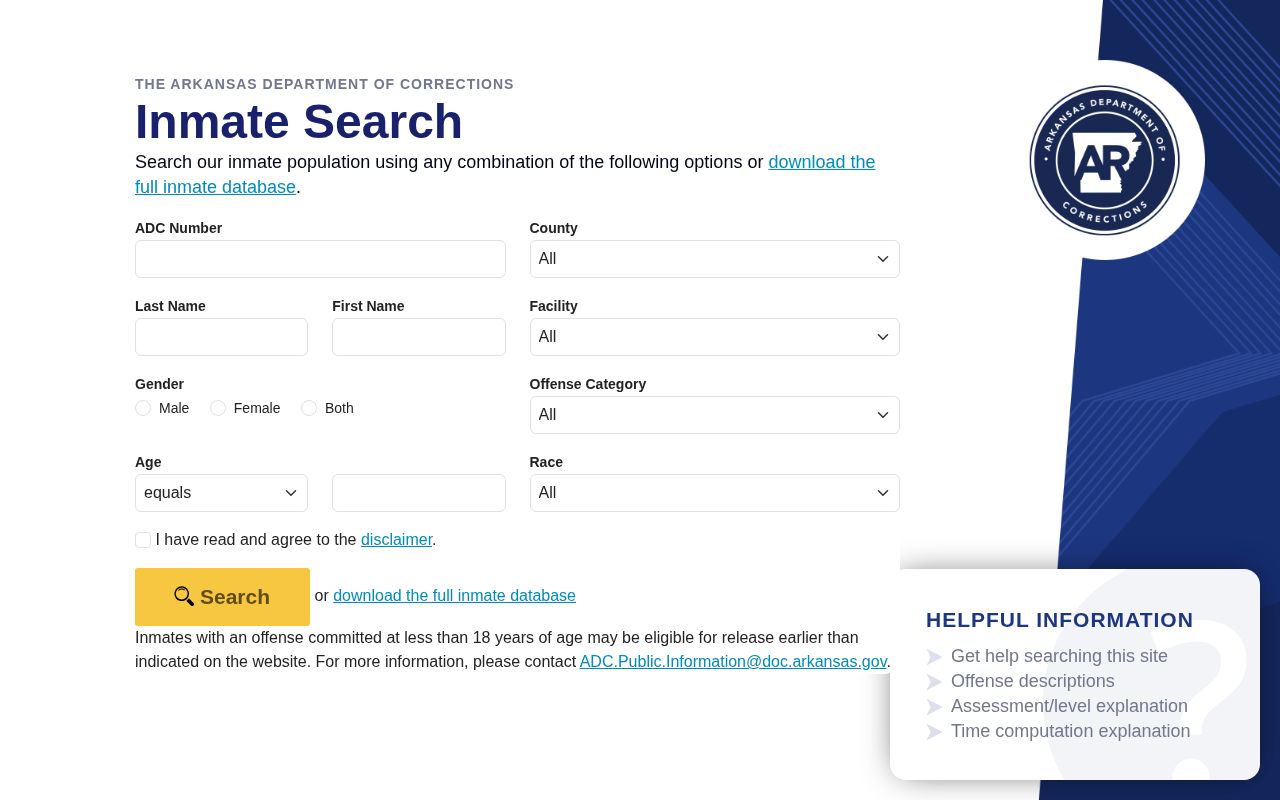
The form narrows an offender lookup before a profile opens. The photo still deserves a check against other identifying details.
- Open the official search and accept its disclaimer. Use the direct inmate search or reach it through DOC Online Services.
- Enter the ADC number if it is known. Otherwise begin with a last name and add as much of the first name as the form allows.
- Use county, facility, gender, offense category, age, or race only when another reliable record supports those details. The county field can describe the case context, not where the person was arrested or is housed now.
- Open a likely result and compare the ADC number, name, age or birth details, facility, and other profile fields. Save the date of the search because custody and projected dates can change.
- Read “Inmate Photo” as an ADC institutional image. For the underlying case outcome, check Search ARCourts; for the original county booking photo, contact the county jail or arresting agency.
The DOC Family and Friends Guide lists gaps in coverage. People held under an out-of-state corrections compact may not appear. Neither may those on the ADC waiting list. They have not yet transferred from a county jail. A missing person could simply still be in county custody. He might be awaiting transfer, or he could be held in another state. He may also have been released. An empty search never rules out an arrest.
When an ADC Search Is Empty
A blank result can stem from a system boundary, a spelling difference, or a weak match. It does not prove a clean history. The DOC family guide notes that some people under an out-of-state corrections compact, plus those awaiting transfer from county jail, may not appear. The ADC search is a live prison-information service. It is not a historical archive. Every person Arkansas corrections has processed will not show there.
Pick the next source by your question. For a fresh arrest or someone awaiting court, go to the county jail or the arresting agency tied to the event. A roster tracks current custody. A booking record can still sit with the custodian after release. If nothing appears online, send a narrow request to that records office. The county directory routes you to local paths. No single ADC screen replaces all county systems.
For a prison sentence or transfer, return to ADC with the agency number or verified name details. Court outcomes live in the public docket. Search there instead. Skip the county field as a jail-location tool. Never assume an ADC result shows where someone was booked. Each system carries its own scope and update timing, so describe any result with its source and the date checked.
Read an ADC Offender Profile
An ADC search result leads with the basics. You get an agency number, a name, and an "Inmate Photo." Below that sit custody details, physical descriptions, and sentence information. The live profile governs. Whatever it shows on the day of a search is what you get. It tracks corrections status, not the courtroom. A disposition, meaning the court's recorded outcome, lives in the court file. The ADC page is not that file. Its fields can shift over time. Arkansas's public-information rule opens certain categories to the public while keeping other records closed.
| Profile item | What it helps identify |
|---|---|
| ADC number, name, aliases | Match the search result to the agency record; use the number when available because names can overlap. |
| “Inmate Photo” and physical description | View the most recent institutional image shown with listed traits such as race, sex, hair and eye color, height, weight, or age. It is not automatically the county booking photograph. |
| Facility and confinement details | See the listed prison location, custody classification, and confinement information available in the public profile. |
| Receipt, sentence, and offense fields | Understand the state-corrections record’s initial receipt date, meaning the date ADC first received the person, and its sentence context. Use the court docket for the case record and disposition. |
| Custody class and time information | Read classification, good-time class, total time, and prior ADC incarcerations only when the live profile displays them. Good-time class is a sentence-credit category. |
| Projected eligibility, transfer, or release | Read dates as current administrative estimates shown by ADC, not as a guarantee that release or transfer will happen on that date. |
| Movement and prior ADC history | Follow the institutional history when those fields appear. A public profile may not show every past stay or record. |
Not everything in an inmate file is public. The dividing line sits in Rule 16 CAR § 30-304, which spells out public information for correctional facilities and for probation or parole. That list covers photographs, basic identity details, physical data, facility placement, offense data, and sentence terms. Treatment information stays protected. So a public page has no business inferring drug, alcohol, or mental-health facts from a status code. Someone's enrollment in a program proves nothing either.
When a match turns up, sort the fields by source. Ask which came from ADC, which from the court. A case number and a judgment confirm the legal outcome, while an ADC status field only describes corrections custody. Those records answer related but different questions.
ADC Photos and Update Rules
Arkansas publishes no fixed refresh schedule for ADC prison profile photos. The honest description is simple. It's the most recent institutional image the search shows, viewed on the date you saw it. The page promises nothing about cycles. A photo need not change after a person's appearance does. County booking images run on their own clocks, newer or older. Some people have no county image at all.
Community corrections records follow a different rule. The Division of Community Correction applies Administrative Directive 19-18 to probationers, parolees, and ACC residents. A digital photo goes in at intake unless one less than a year old exists. A new photo follows each year. A major change in appearance triggers one too. The Omega program gets its own every-intake rule. That timetable binds DCC case records only. ADC prison profile photos answer to no such published cycle.
The confusion is understandable, since one department name covers prisons and community supervision alike. A DCC supervision photo and an ADC prison photo are both official corrections records, yet they come from different processes, so a statewide mugshot search should never merge them into one "latest mugshot" claim.
Note: An image’s capture date and its public profile date may differ, so record the access date and avoid claiming that a photo is current.
ADC Mugshots vs County Booking Photos
Source and custody stage tell the story. ADC's image belongs to an institutional corrections profile. A county jail booking image comes from intake after an arrest. The two can look alike. They may still differ in dates, agencies, release rules, and record numbers, so the label "mugshot" on a result settles nothing about provenance.
| Record type | Who holds it and when it applies | Where to check |
|---|---|---|
| ADC institutional photo | Arkansas Division of Correction; tied to the prison profile and state-corrections custody. | Official ADC inmate search; a missing result may mean the person is outside the search population. |
| County booking photo | The county jail or arresting agency; taken during jail processing, subject to law and local publication practice. | That county’s roster or a specific Arkansas FOIA request to the records custodian. |
| Court case image or filing | The court docket; case documents can show filings and outcomes but are not a jail-photo archive. | Search ARCourts by name or case number, then inspect the docket and judgment. |
A county arrest can end in ADC custody. The county booking record still stands alone. It survives even after a prison profile appears. Booking photos and detention logs count as booking records under Ark. Code Ann. § 13-4-404, which requires counties to retain them for at least five years. That minimum says nothing about online rosters. A county can pull its roster early. Questions about the original intake or photo go through the Arkansas County Directory. Questions about the prison image go to the ADC search.
Never read a sentence, transfer, or release field as a new arrest. The ADC profile speaks only to the state prison record. The county jail, the court, and the state prison each hold a different stage of the story.
Request ADC Records and Photos
Start with the live search. That covers most current profiles. Older institutional photos, past movement entries, or records missing from the database take a different path. Use the DOC contact page to confirm the current records or public-information route before writing. Name the person. Add the ADC number if you have it. Give a date range. Describe the exact item wanted: one photograph, a sentence record, or a movement entry. A narrow request travels faster than a demand for a whole inmate file.
Keep Arkansas FOIA requests pointed at records that already exist. The law does not require DOC to write reports or interpret a status for you. A custodian generally must respond within three business days. The response states whether the record will be produced, does not exist, is exempt, or needs a lawful delay or clarification. That clock covers the answer, not the delivery. Reproduction and mailing costs can still apply. The Attorney General’s FOIA guidance walks through the request and review process.
DOC Administrative Rule 804 treats photographs as part of an inmate record. Disclosure is limited, though. The rule and any court order control what leaves the file. A record can still be withheld or redacted. No statute promises release of an old image. If access is denied, ask for the legal basis. Then request any nonexempt part that can be separated out. Skip mailing extra sensitive documents. An ADC number plus a clear description identifies the record just fine.
One limit deserves mention. The public inmate search serves current information only. Former offenders may not stay searchable with their photos after release. For an older profile, ask DOC for the historical record directly. Expect the disclosure rule or a court order to shape what you receive.
- Check the current ADC profile and copy its agency number and the date the information was viewed.
- Use DOC’s current contact page to direct a written request to the proper records custodian.
- Name the exact existing record, person, ADC number, and date range; say whether inspection or an electronic copy is requested.
- Ask the custodian to identify any redaction, exemption, fee, or transfer path that applies. Do not assume the live profile retains every former offender.
Note: DOC’s online inmate-data download is a structured data service, not a promise of photographs; the live individual profile remains the photo lookup.